

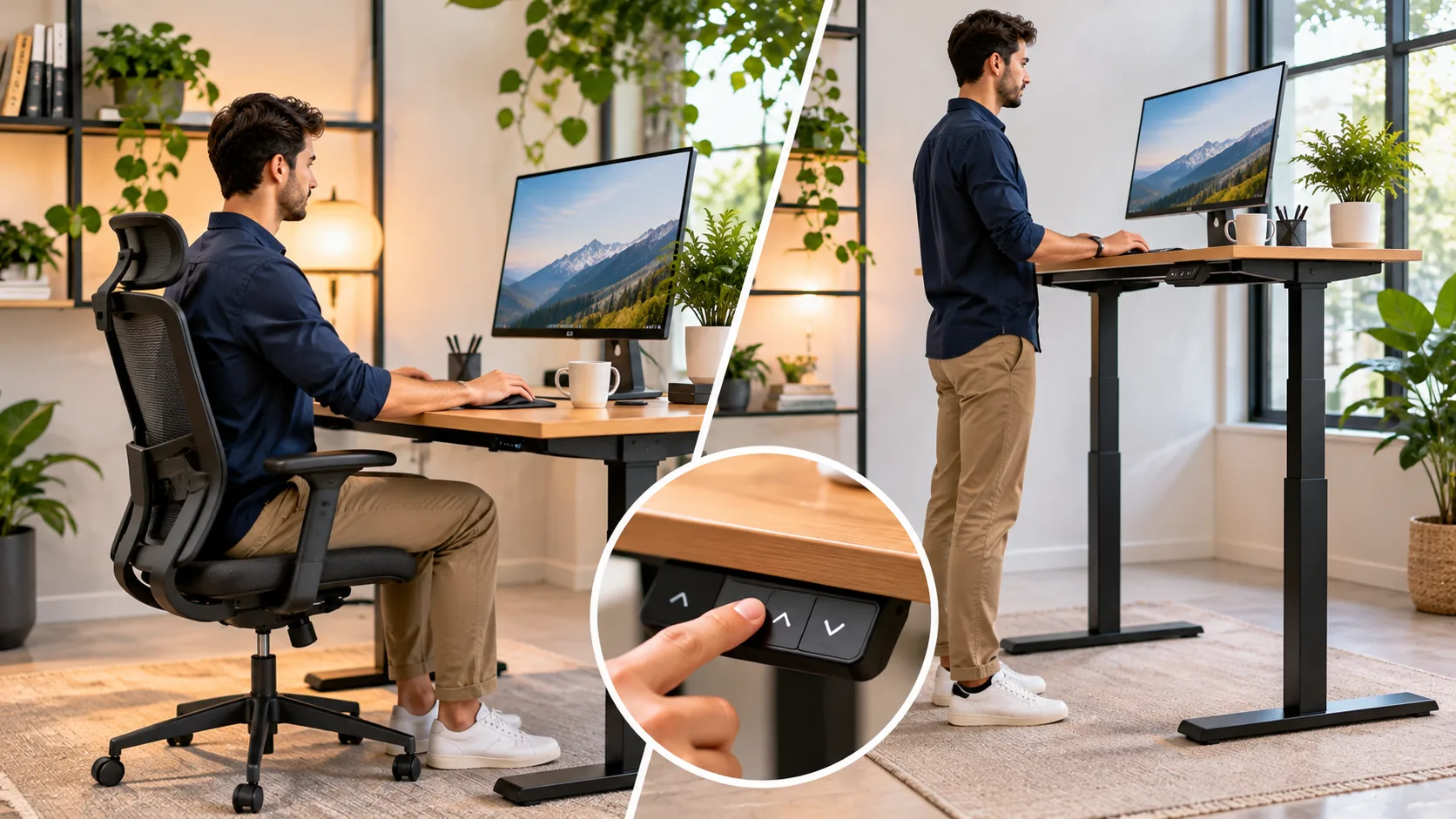
A standing desk is a popular workspace option designed to help people work while standing instead of sitting throughout the day. As more people spend extended periods using computers, studying, and working from home, interest in flexible desk setups has increased. Standing desks provide an alternative to traditional office furniture and allow users to change their working positions. However, understanding their features, benefits, and limitations is important before choosing one.
A standing desk is a desk designed to support work while a person is standing. Some models have a fixed height, while others can be adjusted for sitting and standing positions. These desks are used in offices, home workspaces, classrooms, and other environments. This guide explains the standing desk meaning, different types, common uses, practical examples, potential benefits, disadvantages, and tips for creating a comfortable workstation.
What Is a Standing Desk?
A standing desk is a workstation that allows someone to perform tasks while standing upright. It provides a surface for computers, monitors, keyboards, paperwork, and other work materials. Unlike a conventional desk designed mainly for seated use, a standing desk places the work surface at a height suitable for standing. Some models offer adjustable configurations.
Standing desks are sometimes called stand-up desks or height-adjustable workstations. However, these terms do not always describe identical products. A fixed standing desk remains at one height, while a sit-stand desk can move between different positions. Understanding this distinction helps users select furniture that matches their daily activities.
The main purpose of a standing desk is to provide more flexibility in how work is performed. People can use these desks for typing, reading, online meetings, and other tasks. Adjustable models make changing positions easier throughout the day. However, a standing desk is not a complete solution for discomfort or inactivity caused by prolonged work.
How Does a Standing Desk Work?
A standing desk works by positioning the work surface at a suitable height for someone who is standing. Fixed-height models remain in one position and are designed specifically for standing tasks. Adjustable desks contain mechanisms that allow the surface to move vertically. These adjustments accommodate different users and working preferences.
Manual standing desks use mechanical systems such as cranks or other adjustment controls. Electric models use motors to raise or lower the desktop. Some electric desks include memory settings for commonly used heights. The exact features depend on the manufacturer and product design.
A standing desk converter works differently because it sits on top of an existing desk. The converter raises selected equipment, such as a monitor and keyboard, into a standing position. This can provide flexibility without replacing the entire workstation. However, the converter must be stable and suitable for the weight and arrangement of the equipment.
Different Types of Standing Desks
Standing desks are available in several designs to accommodate different work environments. Fixed-height desks, manual adjustable desks, electric standing desks, and desktop converters are common options. Each type provides a different balance of flexibility, convenience, and cost. Choosing the right design depends on your workspace and daily tasks.
Fixed-height standing desks usually have a simple construction without moving components. They may suit environments where standing work is the primary requirement. However, they offer limited flexibility when a seated position becomes necessary. Users may need additional furniture or seating arrangements for changing positions.
Height-adjustable desks provide more options because the work surface can move between different heights. Electric models are often convenient for frequent adjustments, while manual versions may have fewer electronic components. Desktop converters can be useful for adapting an existing desk. Comparing these designs helps identify the most practical option for different needs.
Electric Standing Desks: Features and Uses
Electric standing desks use motorized lifting mechanisms to change the height of the work surface. Users can usually operate the desk through buttons or an electronic control panel. Some models offer preset height positions for different working arrangements. These features can make adjustments more convenient during a busy workday.
Electric desks are commonly used in offices and home workspaces where people alternate between sitting and standing. They can accommodate computers, monitors, keyboards, and other typical office equipment. However, weight capacity and stability vary by model. Users should follow the manufacturer’s specifications when arranging equipment.
The main advantages of electric desks include convenience and adjustable positioning. However, their higher price and reliance on electronic components may be disadvantages. Motors and controls can occasionally require repair or maintenance. Choosing a reliable model with suitable warranty coverage can help reduce long-term concerns.
Manual Standing Desks: Meaning and Benefits
Manual standing desks allow users to adjust the work surface without an electric motor. They may use hand cranks, counterbalance mechanisms, or other mechanical systems. These designs can provide flexibility while avoiding some electronic components. Their usefulness depends on how easily the height can be changed.
A manual adjustable desk may appeal to people who prefer a straightforward workstation. Some models cost less than comparable electric options, although prices vary considerably. They can also be useful where electrical access is limited. However, adjustment speed and convenience depend on the specific mechanism.
Manual desks still require attention to stability and weight capacity. Heavy equipment may make certain adjustment systems more difficult to operate. Before purchasing, review the recommended load and adjustment range. A suitable manual desk should support both comfortable positioning and everyday usability.
What Is a Standing Desk Converter?
A standing desk converter is a platform designed to sit on top of an existing desk. It raises a computer monitor, keyboard, or other equipment to a suitable standing height. This allows users to modify their workstation without purchasing an entirely new desk. Many converters also provide adjustable height settings.
Converters are commonly used in offices where replacing existing furniture may be inconvenient. They can also work in home offices with limited space or budgets. However, some converters occupy a substantial portion of the original desktop. Measuring available space before purchasing is important.
The stability and weight capacity of a converter are essential considerations. The platform must support the intended equipment without excessive movement. Keyboard positioning and monitor height should also remain comfortable. A converter can be practical, but its design must suit the existing desk and daily working requirements.
What Are Standing Desks Used For?
Standing desks are primarily used for computer-based work, writing, reading, and other desk activities. They allow people to perform familiar tasks from a standing position. Many users prefer adjustable models because they provide options for changing posture. This flexibility can be useful during long working or study sessions.
Office employees may use standing desks for typing documents, reviewing information, or participating in video meetings. Home-based workers can use them for similar tasks. Students may also benefit from adjustable workstations when the furniture is appropriately designed. The desk’s purpose is to support work rather than provide exercise.
Standing desks can also be found in specialized environments. Some reception areas, studios, and collaborative workspaces use elevated work surfaces. These settings may require users to move between tasks and locations. The appropriate desk design depends on the activity, available space, and ergonomic requirements.
Standing Desk Benefits for Office Workers
One potential benefit of standing desks is reduced time spent sitting when users regularly alternate positions. Prolonged sedentary behavior is associated with several health concerns, making opportunities for movement valuable. Adjustable desks can support changes in working posture. However, standing still for long periods is not a replacement for regular physical activity.
Some people report feeling more comfortable when they can change positions during computer work. Alternating between sitting and standing may reduce discomfort associated with remaining in one posture for too long. Individual experiences vary considerably. Proper workstation setup is important regardless of whether the user is sitting or standing.
Standing desks may also help users develop more flexible work routines. A person can stand for certain tasks and sit when preferred. However, evidence for substantial improvements in productivity or long-term health outcomes remains mixed or limited. The most practical benefit is often having the freedom to change working positions.
Are Standing Desks Better Than Sitting Desks?
Standing desks are not automatically better than traditional sitting desks for everyone. Both can support productive work when properly arranged. The main advantage of an adjustable standing desk is its ability to accommodate different positions. This flexibility may help users avoid remaining in the same posture throughout the day.
Traditional desks can be comfortable and practical when paired with suitable chairs and equipment arrangements. They are often less expensive and may require less adjustment. However, extended sitting without movement can contribute to discomfort. Regular breaks and changes in position are helpful regardless of desk type.
The best approach often involves alternating between sitting, standing, and moving. Neither sitting continuously nor standing continuously is ideal for every person. A height-adjustable desk makes position changes convenient but does not eliminate the need for breaks. Individual comfort and task requirements should guide how the workstation is used.
How Standing Desks Support Better Posture
A properly adjusted standing desk can help position work equipment at a comfortable height. When the keyboard and monitor are arranged appropriately, users may find it easier to maintain a relaxed working position. This can reduce unnecessary reaching or awkward neck positions. However, good posture depends on the entire workstation setup.
Standing with the shoulders relaxed and the arms positioned comfortably can support ergonomic working habits. The monitor should be placed so that users do not need to repeatedly tilt their heads. Keyboard placement should also avoid excessive wrist bending. These principles apply to both standing and seated workstations.
There is no single perfect posture that everyone must maintain continuously. Remaining motionless, even in a seemingly correct position, may become uncomfortable. Changing posture and taking movement breaks is generally more practical. A standing desk is most useful when it supports flexibility rather than encouraging rigid positioning.
Standing Desks and Back Pain: What to Know
Some people consider standing desks because they experience discomfort during prolonged sitting. Changing positions may help reduce certain types of work-related discomfort. However, standing desks do not reliably treat every cause of back pain. Results depend on individual circumstances, workstation setup, and the underlying condition.
Poor standing desk positioning can also create discomfort. A desk that is too high may encourage raised shoulders, while an unsuitable monitor position can contribute to neck strain. Standing for extended periods may cause leg or lower-back fatigue. Appropriate adjustments help reduce these problems.
People with persistent or worsening back pain should not rely entirely on a furniture change. A healthcare professional can help evaluate possible causes and recommend suitable management. Workstation improvements may be one useful part of a broader approach. Regular movement and comfortable positioning remain important regardless of desk choice.
Standing Desks for Home Offices
Standing desks are popular in home offices because they offer flexible workstation arrangements. People working remotely often spend several hours using computers and attending online meetings. An adjustable desk allows them to change positions without leaving their workspace. This may make long work sessions more comfortable.
Space is an important consideration when choosing a standing desk for home use. Compact models may fit smaller rooms, while larger desks accommodate multiple monitors and additional equipment. Desktop converters provide another option when replacing furniture is impractical. Measuring the room helps avoid unnecessary purchasing mistakes.
Home office users should also consider cable management and electrical access. Adjustable desks require enough cable length for safe movement between height settings. Equipment should remain stable during adjustments. A well-organized workspace supports convenience and reduces the risk of damaged cords or falling objects.
Standing Desk Examples in Different Workplaces
Corporate offices commonly use electric sit-stand desks for employees who perform computer-based tasks. These workstations may include monitors, keyboards, and adjustable chairs. Employees can change positions according to their preferences. The desks are intended to support flexible working arrangements rather than require continuous standing.
Creative studios may use standing workstations for drawing, planning, or reviewing design materials. Some environments benefit from larger surfaces that accommodate several tools. The appropriate height depends on the task. Activities requiring detailed hand movements may need different positioning from ordinary computer work.
Reception counters and collaborative work areas also provide examples of standing work surfaces. These desks may be designed for shorter interactions rather than full-day computer use. Fixed-height counters can work for particular tasks but offer less individual flexibility. Understanding the intended use helps distinguish specialized counters from ergonomic adjustable desks.
How to Set Up a Standing Desk Correctly
A comfortable standing desk setup begins with adjusting the height to suit your working position. The keyboard should generally allow your elbows to remain near your sides with relaxed shoulders. Your wrists should be positioned comfortably without excessive bending. Exact measurements vary because people and equipment differ.
The monitor should be placed at a comfortable viewing distance, with the top of the screen generally at or slightly below eye level. Users should avoid repeatedly tilting their heads upward or downward. Multiple monitor arrangements may require additional adjustments. Monitor stands or adjustable arms can help improve positioning.
Footwear and floor conditions also affect standing comfort. Supportive, comfortable shoes may be helpful, depending on the environment. Some people prefer anti-fatigue mats for certain standing tasks. However, no accessory replaces the importance of taking breaks and changing positions regularly.
How Long Should You Stand at a Standing Desk?
There is no universal standing duration that works best for everyone. Comfort depends on individual health, footwear, workload, and workstation arrangement. Beginners may prefer short standing periods rather than remaining upright for several hours. Gradually discovering a comfortable routine is more practical than following rigid targets.
Alternating between sitting and standing can reduce the time spent in one position. For example, some people stand during short meetings and sit during detailed computer work. Others change positions according to comfort. The goal is to introduce flexibility rather than achieve a specific number of standing hours.
Regular movement breaks remain important even when a standing desk is available. Brief walks, stretching, or changing tasks can provide opportunities to move. Standing still does not offer the same benefits as physical activity. A balanced work routine includes varied positions and appropriate movement throughout the day.
Common Standing Desk Mistakes to Avoid
One common mistake is assuming that standing all day is automatically healthier than sitting. Prolonged standing can cause fatigue and discomfort in the legs, feet, and lower back. A standing desk should support changes in position. It should not encourage users to remain upright when they need to rest.
Another mistake is setting the desk at an unsuitable height. A work surface that is too high can strain the shoulders, while one that is too low may encourage awkward bending. Monitor and keyboard placement also influence comfort. Taking time to adjust the workstation can prevent unnecessary difficulties.
Ignoring stability and equipment capacity is another important concern. Overloading a desk or using an unstable setup can create safety risks. Adjustable desks should be operated according to manufacturer instructions. Proper cable management and clear floor space help maintain a practical working environment.
How Much Does a Standing Desk Cost?
Standing desk prices vary according to design, materials, dimensions, and adjustment features. Basic desktop converters are often less expensive than complete motorized desks. Manual adjustable desks can provide a middle option, although pricing overlaps between categories. Premium electric models may cost considerably more because of additional features.
A simple standing desk converter may cost roughly $50 to $200, depending on construction and capacity. Many complete electric sit-stand desks fall within a broad range of approximately $200 to $800 or more. Premium products can exceed these amounts. These are general U.S. market estimates rather than verified current retail prices.
Before purchasing, consider the total value rather than focusing only on the initial price. Warranty coverage, stability, desktop space, and adjustment range affect long-term usefulness. Shipping and assembly requirements may also influence the final cost. Comparing product specifications helps identify suitable options within a practical budget.
How to Choose the Best Standing Desk
Choosing a standing desk begins with understanding your workspace and daily activities. Consider whether you need a complete desk or a converter for existing furniture. Measure the available space and identify the equipment you plan to use. This provides a clearer foundation for comparing products.
Height adjustment range is especially important because a desk should accommodate comfortable sitting and standing positions. Stability, weight capacity, and desktop dimensions also deserve attention. Electric models may offer convenient controls and memory settings. However, additional features are only valuable when they support your actual needs.
Warranty terms and manufacturer support can also influence purchasing decisions. Adjustable desks contain components that may require maintenance over time. Reading product instructions and comparing independent reviews can help identify potential concerns. The best standing desk is one that fits your workspace, supports comfortable positioning, and provides dependable performance.
Are Standing Desks Worth Buying?
Standing desks can be worthwhile for people who want more flexibility during computer-based work. Adjustable models provide opportunities to alternate between sitting and standing. This may improve comfort for some users and reduce continuous sitting time. However, individual benefits vary, and a standing desk is not essential for everyone.
Cost is another consideration. An adjustable desk may represent a substantial investment compared with ordinary office furniture. People with existing comfortable setups may prefer adding movement breaks instead of replacing their desks. A converter may also provide a less expensive way to explore standing work.
The decision should depend on personal needs, available space, and realistic expectations. Standing desks do not guarantee improved productivity, weight loss, or relief from medical conditions. Their primary value comes from providing options for changing working positions. When used thoughtfully, they can support a more flexible and comfortable workspace.
Conclusion
A standing desk is a workstation designed to support tasks performed while standing. Fixed-height desks, adjustable models, and desktop converters provide different ways to create standing workspaces. These desks are commonly used in offices, homes, studios, and other environments. Their main advantage is offering flexibility in how people work throughout the day.
Standing desks may help reduce prolonged sitting and allow users to change positions more frequently. However, standing continuously can also cause discomfort, and research does not support treating these desks as a complete health solution. Proper equipment placement, stable construction, and regular movement remain important. The most comfortable workstation is one that accommodates different activities and individual preferences.
Choosing a suitable standing desk requires considering desk size, adjustment range, stability, cost, and intended use. A thoughtful setup can make working at a computer more convenient and adaptable. However, expensive features are not always necessary for a comfortable workspace. Combining ergonomic furniture with movement breaks and practical working habits provides a balanced approach to everyday desk work.
Frequently Asked Questions (FAQs)
What Is a Standing Desk Used For?
A standing desk allows people to perform tasks such as computer work, reading, writing, and online meetings while standing. Adjustable versions also support switching between seated and standing positions.
Is a Standing Desk Better Than a Regular Desk?
A standing desk provides greater positioning flexibility, especially when height-adjustable. However, neither standing nor sitting continuously is ideal, and the best choice depends on comfort, workspace needs, and daily activities.
Can a Standing Desk Help With Back Pain?
Changing positions may reduce certain types of work-related discomfort, but standing desks do not treat every cause of back pain. Proper workstation setup and professional advice are important when pain persists.
How Many Hours Should You Use a Standing Desk?
There is no universal number of hours suitable for everyone. Alternating between sitting, standing, and moving according to comfort is generally more practical than remaining in one position for extended periods.
What Is the Difference Between a Standing Desk and a Sit-Stand Desk?
A standing desk may have a fixed height intended for standing work. A sit-stand desk allows height adjustments so users can perform tasks comfortably while either sitting or standing.